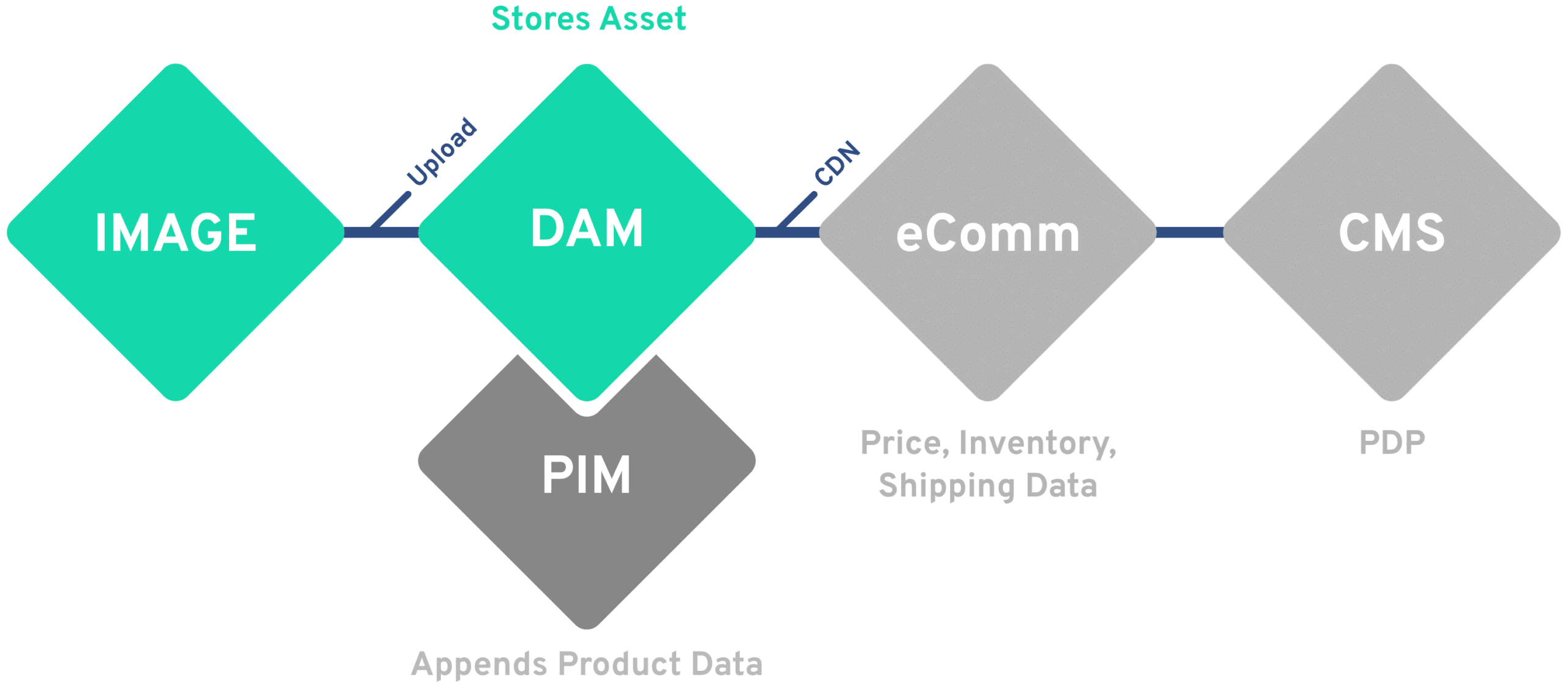
A PIM and a DAM both feed your product pages, so it is easy to assume one can do the other’s job. It can’t. A PIM owns the facts about a product. A DAM owns the images, video and files that show it. Product content works best when the two are connected and each stays in charge of its own data.

Quick answer: Product information management (PIM) is the system of record for product data: SKUs, attributes, descriptions, prices and translations. Digital asset management (DAM) is the system of record for product media and brand assets, with their rights and versions. They are joined by the SKU, so every channel gets the right data with the right images.

DAM vs PIM at a glance

What each system owns, side by side.
DAM PIM
Main job Manage the media and brand assets that show the product Manage the structured data that describes the product
Content Images, video, 3D, packaging artwork, documents, brand files SKUs, attributes, specs, descriptions, prices, translations
Primary users Creative, brand, marketing ops, agencies Product, merchandising, ecommerce, data teams
Organized by Metadata, taxonomy, collections, campaigns Product hierarchy, categories, attributes, variants
Governs Usage rights, approvals, versions, renditions Data quality, completeness, channel-specific attributes
Feeds Every channel: web, social, print, retail, partners Commerce sites, marketplaces, catalogs, ERP
Key identifier Asset ID, linked to SKUs SKU or product ID

What is a PIM?

A product information management system is where a company keeps one clean, complete record for every product it sells. It holds attributes such as size, material, ingredients and dimensions, marketing descriptions in every language, and the channel-specific fields each marketplace or retailer requires.
Its job is data quality: making sure every product is complete and consistent before it reaches a commerce site, a catalog or a retailer feed.

What is a DAM?

A digital asset management platform is the central library for the media that shows the product and the brand: packshots, lifestyle photography, video, 3D models, packaging artwork and documents. Every asset carries metadata, usage rights and version history.
Its job is governance and reuse: the right approved asset, in the right format, cleared for the right channel.

Where PIM and DAM overlap

PIM and DAM sit next to each other in the product content stack, which is why their boundaries blur.
Where they overlap
Both describe products, both feed product pages, and both need clean classification. Many PIMs can store a few images and many DAMs can hold some product fields.
Where they don’t
A PIM can’t manage rights, renditions, video or creative versions at scale. A DAM is not built to validate thousands of attributes per channel. Using one as the other works until volume or channels grow.

Do you need a PIM, a DAM, or both?

A PIM is enough if
  • You sell few products with few images
  • Images are web-only and rarely change
  • No agencies or markets need asset access
A DAM is enough if
  • Assets matter more than product data
  • You sell few SKUs or none online
  • Product facts live in your commerce platform
You need both if
  • You sell many SKUs in many channels
  • The same images serve web, retail and print
  • Pack or product changes must reach every page
Most brands that sell through more than one channel land in the third column. The question then is how the two systems share work.

How a PIM DAM integration works

A PIM DAM integration links the two systems so each keeps its own job and shares what the other needs. A typical setup works in six steps:
1

Agree the system of record per field
Product data is owned by the PIM, media and rights by the DAM. Write it down field by field before connecting anything.
2

Link assets to products by SKU
Every product asset in the DAM carries the SKU, so it can be matched to its PIM record automatically.
3

Sync product data into the DAM
Attributes such as brand, range or color flow from PIM to DAM, so people can find assets by product facts, not only by keywords.
4

Send approved asset links to the PIM
The DAM passes links to the right renditions, not copied files, so product records always show the current approved image.
5

Let changes trigger updates
A pack change in the PIM flags affected assets in the DAM; an expired license in the DAM removes the image from product records.
6

Publish through one flow
Channels receive complete products: PIM data with DAM media, already checked for completeness and rights.
This is a bi-directional sync with clear field ownership, so neither system overwrites the other.
DAM PIM Integration

Benefits of connecting PIM and DAM

Connecting the two systems pays off in daily work, not only in architecture diagrams.
Find assets by product facts
Search the DAM by SKU, range or specification instead of guessing file names.
Reuse what already exists
When assets are findable by product, teams stop reshooting products that were already photographed.
Publish without copying files
Product pages pull approved renditions by link; nobody downloads and re-uploads images.
Keep data consistent
One taxonomy for products and assets means fewer clean-up projects and fewer mismatched pages.
Stay in step with change
Pack, claim or license changes reach every affected asset and product record.

Common mistakes to avoid

Storing product data in the DAM
It works for a few fields, then attributes drift out of date in two places.
Storing master images in the PIM
PIM image fields rarely handle rights, versions or video, so expired images stay live.
Copying files instead of linking
Copies go stale; links always point to the current approved rendition.
No owner per field
Without a written system of record, the two systems overwrite each other.

Where Tenovos fits

Tenovos is a data-first DAM and content intelligence platform. Tenovos Connect syncs SKUs, attributes and metadata from your PIM without developers, and sends approved asset links back. Because Tenovos tracks how assets are used and perform, you can see which product images actually drive results.

Book a demo

Frequently Asked Questions

What is the difference between PIM and DAM?

A PIM manages structured product data such as SKUs, attributes, descriptions and prices. A DAM manages the images, video and files that show the product, with their rights and versions. The PIM describes the product; the DAM shows it.

Can a DAM replace a PIM?

Not for companies with many products or channels. A DAM can store some product fields, but it is not built to validate attributes, variants and channel-specific data at scale.

Can a PIM store product images?

Most PIMs can hold image links or a few files per product. They rarely manage usage rights, renditions, video or approvals, which is why images usually live in a DAM and are linked to the PIM.

Which system should own product data?

The PIM. The DAM should receive product attributes from the PIM, not maintain its own copy, so there is one system of record per field.

How do you connect a PIM and a DAM?

Through a native connector, an integration platform or the systems' APIs. Assets are linked to products by SKU, product data flows from PIM to DAM, and approved asset links flow from DAM to PIM.

How do PIM, DAM and CMS work together?

The PIM supplies product data, the DAM supplies approved media, and the CMS or commerce platform assembles them into pages. Each system stays the source of truth for its own content.

Related Resources

feature reference architecture
Optimize Your Media Supply Chain: The Blueprint for Composable Architecture (and the Role of DAM)

Optimize Your Media Supply Chain: The Blueprint for Composable Architecture (and the Role of DAM)

feature image blog tenovos 2024 beyond
Retail Challenges and Digital Transformation: 2024 & Beyond

Retail Challenges and Digital Transformation: 2024 & Beyond

Feature 02 implementation tenovos webinar
Why DAM Implementations Fail and How to Plan for a Successful DAM Project

Why DAM Implementations Fail and How to Plan for a Successful DAM Project