
A DAM is only as useful as people’s ability to find things in it. Search quality, filters, automation and AI tagging all depend on one piece of design work that is easy to skip: the taxonomy. This guide explains what a DAM taxonomy is, how it differs from folders, tags and metadata, and how to build one that still works after the third reorganization.
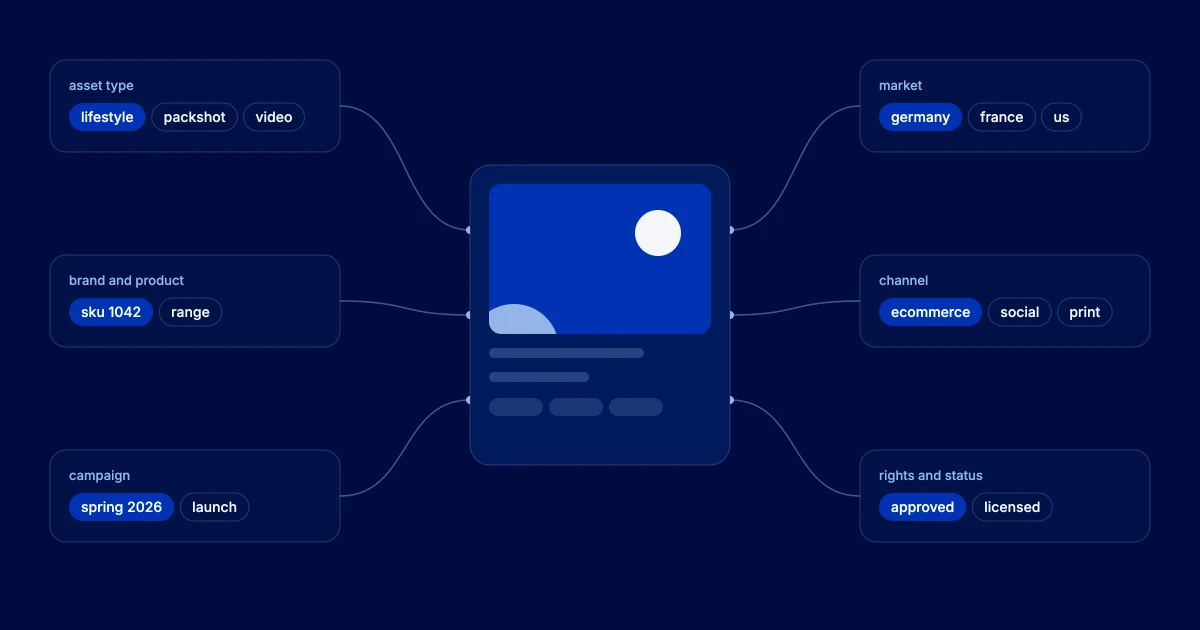
Quick answer: A DAM taxonomy is the agreed set of categories and terms used to classify assets, such as asset type, brand, product, campaign, market and channel. Each category is a list of approved values, often arranged in a hierarchy. It powers filters, search, permissions and automation, and gives AI tagging a controlled vocabulary to map to.
DAM taxonomy diagram: one asset classified by six facets, asset type, brand and product, campaign, market, channel, and rights and status
One asset, six facets. Each facet holds approved values, so the same image can be found by product, campaign, market or channel.

Folders, tags, taxonomy and metadata

Teams often use these words interchangeably. They are different tools that work together.
What it is Good for Breaks down when
Folders A single location for each file Simple libraries with one owner An asset belongs in two places at once
Free tags Any keyword anyone types Quick personal notes Ten people spell the same thing ten ways
Taxonomy Approved terms in defined categories, often hierarchical Consistent filters, search and rules Nobody owns it, so terms go out of date
Metadata model All the fields an asset carries, including taxonomy fields Rights, dates, IDs, descriptions Fields are added without a purpose
Ontology Terms plus the relationships between them Linking products, campaigns and people It is built before the basics are stable

What is a DAM taxonomy?

A taxonomy turns the way your company talks about its content into a structure a system can use. Instead of a free-text field where one person types “SS26”, another “Spring 2026” and a third “spring-summer”, there is one field, Season, with one approved value.
Most DAM taxonomies are faceted: several independent categories rather than one big tree. An image can be Lifestyle (asset type), Brand A (brand), Spring 2026 (campaign) and Germany (market) at the same time. People then narrow results with faceted search, combining filters instead of guessing the folder someone else chose.

Common DAM taxonomy facets

Facets differ by business, but most brand libraries start from these six. Each one should answer a question people actually ask when they search.
Asset type
  • Photography: packshot, lifestyle, detail
  • Video: hero film, social cut, tutorial
  • Design: packaging artwork, banner, print
Brand and product
  • Brand
  • Range or line
  • Product, linked by SKU
Campaign
  • Campaign name
  • Season or year
  • Launch wave
Market and language
  • Region
  • Country
  • Language
Channel
  • Ecommerce, social, retail, print, paid media
Rights and status
  • Licensed, owned, restricted
  • Expiry date
  • Draft, approved, archived
Keep fields that change on their own, such as usage rights and approval status, separate from descriptive facets. They drive rules, not just search.

How to build a DAM taxonomy in 7 steps

A taxonomy that lasts is designed around search behavior and maintained like a product. A practical method:
1

Start from how people search
Interview the teams who use the library and read search logs if you have them. List the questions people ask, such as “latest approved packshot for SKU 1042 in German”.
2

Choose a small set of facets
Turn those questions into five to eight facets. If a facet answers no real question, drop it.
3

Write the approved values
For each facet, list the values, their definitions and any synonyms. Keep hierarchies shallow, two or three levels at most.
4

Reuse identifiers from other systems
Take product, market and campaign values from the systems that own them, such as the PIM or the campaign calendar, instead of retyping them.
5

Decide what is required
Make a few fields mandatory at upload, the ones that drive rights, routing and search. Everything else can be optional or filled automatically.
6

Test with real assets
Classify a few hundred existing assets. Values that never get used, or that people disagree on, need rework before launch.
7

Assign an owner and a change process
One person or team approves new terms, merges duplicates and retires old ones. Review the taxonomy at least twice a year.

Taxonomy, AI search and agents

AI makes taxonomy more important, not less. Auto-tagging models recognize objects, scenes and text, but they produce generic labels. Mapping those labels to your approved values is what makes them usable in filters and rules. Semantic search can find assets without exact keywords, yet results are still narrowed by taxonomy facets such as market, rights status and brand.
Auto-tagging needs a target
A model that tags “shoe, outdoor, person” helps little. Mapped to Product line, Lifestyle and Spring 2026, the same tags become filters.
Agents need clear rules
An AI agent asked for an approved hero image for Germany can only act safely if market, approval and rights are reliable, structured fields.
Synonyms close the gap
A synonym ring links “trainer”, “sneaker” and “running shoe” to one value, so both people and models land in the same place.
Usage data shows what works
When you can see which assets are downloaded, published and perform, unused terms and missing facets become obvious.

Common mistakes to avoid

Copying the org chart
Teams reorganize; the content does not. Classify by what the asset is and where it can be used, not by who made it.
Too many levels
Deep trees force people to guess the path. Facets with shallow lists are faster to use and easier to maintain.
Everything mandatory
Long upload forms lead to wrong values picked to get past the form. Require only what drives search and rules.
No owner
Without someone approving changes, duplicates and outdated terms come back within months.

Where Tenovos fits

Tenovos lets you configure metadata and taxonomy without code, maps AI tags to your own vocabulary, and pulls product and campaign values from connected systems. Because Tenovos shows how assets are found, used and perform, you can see which parts of your taxonomy help people and which need work.

Book a demo

Frequently Asked Questions

What is a DAM taxonomy?

A DAM taxonomy is the agreed set of categories and approved terms used to classify digital assets, such as asset type, brand, product, campaign, market and channel. It makes search, filters, permissions and automation consistent.

What is the difference between taxonomy and metadata?

Metadata is all the information attached to an asset, such as its title, dates, rights and IDs. A taxonomy is the controlled list of terms used in some of those metadata fields, so values are consistent across the library.

Should a DAM use folders or a taxonomy?

Most enterprise DAMs use a taxonomy with faceted search, and keep folders or collections only for working sets. Folders force each asset into one place; facets let it belong to many at once.

How many levels should a DAM taxonomy have?

As few as possible. Two or three levels per facet is usually enough. Depth makes tagging slower and search harder without adding much precision.

Can AI build a DAM taxonomy?

AI can suggest terms and cluster existing tags, which speeds up the work. The final structure still needs people who know how the business searches and which values drive rules such as rights and approvals.

How often should a DAM taxonomy be updated?

Review it at least twice a year and whenever products, markets or campaigns change. A named owner should approve new terms and retire unused ones.